Respond to Customer Reviews with Confidence
A public reply speaks to the reviewer and prospective customers. It should acknowledge the feedback, address the main point, and offer a sensible next step. A helpful response does not need to be long.
Start with the Reviews That Need Attention
Open 'Reviews' in your dashboard and choose 'Needs reply' to find outstanding responses. Read the full review before drafting. A low rating with a clear explanation deserves a different response from a short comment whose meaning is uncertain.
Separate what the customer says from what you can confirm. If the review mentions a delay, for example, acknowledge that experience without inventing a reason. Keep any investigation in your own records and avoid using the public thread to reconstruct the customer's private transaction.
Publish a Reply from Your Workspace
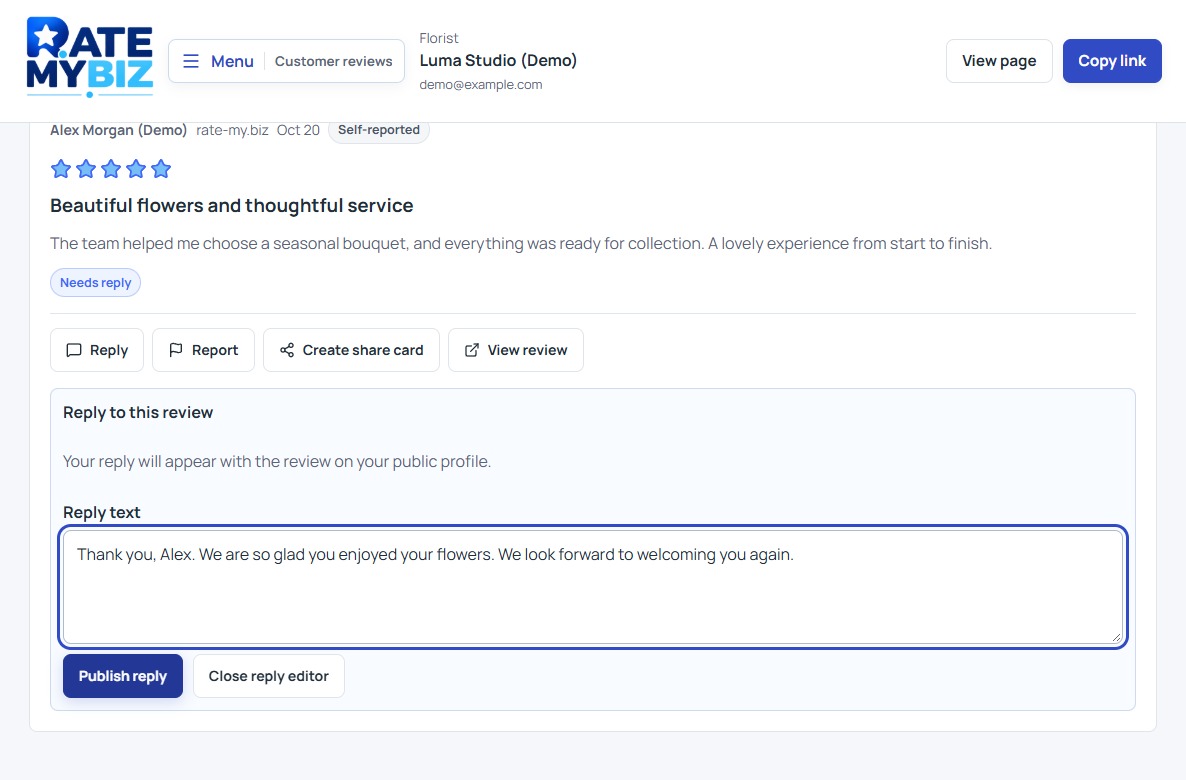
Replies are available on every plan, including Free, subject to your workspace permissions. They appear alongside the review on your public profile. Replies here support reviews collected on Rate My Biz; if an external review is shown, respond through its original service.
 View Full-Size Screenshot(opens in a new tab)
- Find the review and choose Reply.
- Read and edit Reply text. Replace any suggested wording with a response that fits the actual feedback.
- Check the names, facts, tone, and any contact information before choosing Publish reply.
- Wait for the save confirmation. To revise an existing response, choose Update reply and publish the edited text.
Make a Thank-You Specific
Acknowledge one detail the customer chose to share. This makes the reply more useful than repeating the same generic message under every review. Keep it brief and avoid adding a sales pitch that overwhelms the customer's contribution.
Do not reveal details the reviewer omitted, even if they help you recognize the visit. A public thank-you can be warm without naming their order, appointment, companions, or other private information. The reader should understand the response without learning more about the customer than they shared themselves.
Address the Concern and Offer a Next Step
Acknowledge the specific issue in calm language. If you know a mistake occurred, describe the practical action you can take without promising an outcome you cannot deliver. If more information is needed, invite the customer to a suitable private contact channel.
Avoid arguing about the rating or asking the customer to remove the review as a condition of help. Your aim is to make the response useful. Re-read it from the perspective of a new customer who has none of the background you have.
Use Reports for a Specific Concern
If a review raises a policy concern, choose 'Report,' select a 'Reason,' add useful context under 'Additional details (optional),' and choose 'Submit report.' Explain the concern clearly rather than treating a low score as evidence that the review is invalid.
Submitting a report does not automatically hide a review or guarantee removal. Review status follows the moderation process. Keep your response professional while a concern is assessed, and avoid repeating private information from a problematic review in your public reply.
Read the Review GuidelinesKeep this in mind
Key Takeaway
Read first, respond to the specific experience, and keep private details out of public replies. Use reports for policy concerns, not disagreement with a rating.